
Нужна помощь?
Создайте тему в соответствующем разделе
Не нужно писать всё в чат!Загляните на торговую площадку
Там вы можете купить
всё что касается игровых серверовНе хотите бан?
Пожалуйста, ознакомьтесь с нашими правилами
Не нарушайте порядок!Продаёте или покупаете?
Пользуйтесь услугами гаранта
Мы сделаем вашу сделку безопасной
- Кто может продавать файлы?
- Условия использования
-

990,00 ₽
не_даст2 / not_dust2
Автор:
 imhowin
После нескольких заказов игровых локаций для ДМ серверов пришла в голову (возможно?) гениальная мысль, вроде бы такого я еще не встречал.
imhowin
После нескольких заказов игровых локаций для ДМ серверов пришла в голову (возможно?) гениальная мысль, вроде бы такого я еще не встречал.
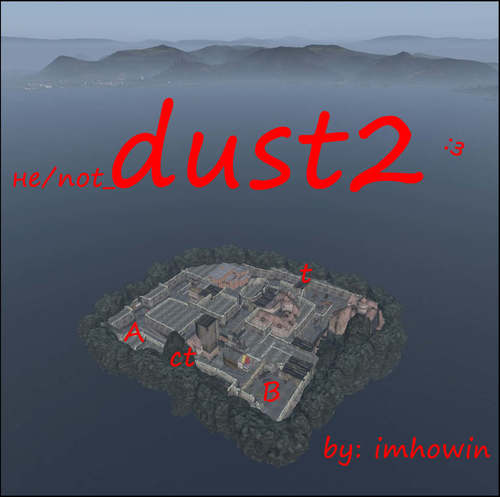
В общем, это не точная и достоверная, но сделанная по мотивам знаменитой карты из КС локация для ностальгирования по былым годам.
Думаю, подойдет для ДМ серверов, ивентов, ну или вообще для любых перестрелок хоть с какой-то смысловой нагрузкой.
В архиве инструкция по установке и файл с координатами.
Ознакомиться можно через скриншоты и по Видео
Локация изолирована и находится около Солнечного, если нужно будет переместить - обращайтесь.
Необходим @BuilderItems для корректной работы.
Кого интересует, могу строить локации на заказ, цели и сложность значения не имеют.
Связь со мной :
Discord: imhowin#0953
Discord канал: https://discord.gg/N4k8TG4f8Q
VK: vk
ВАЖНО! Не надо покупать, если ваших рук не хватает, чтоб настроить по инструкции мапинг, я не буду объяснять, как это делать, полный интернет статей на эту тему, если у вас что-то не работает, то проблема в вас или вашем сервере.
After several orders of game locations for DM servers, a brilliant idea came to my mind (perhaps?), It seems like I have never seen anything like this.
In general, this is not accurate and reliable, but based on the famous map from KS, a location for nostalgia for the old days.
I think it is suitable for DM servers, events, or, in general, for any shootouts with at least some semantic load.
The archive contains installation instructions and a file with coordinates.
You can get acquainted through screenshots and Video
The location is isolated and located near Solnechny, if you need to move - contact me.
Required @BuilderItems to work correctly.
Contact me :
Discord: imhowin#0953
Discord chanel: https://discord.gg/N4k8TG4f8Q
VK: vk
28 покупок 112 скачиваний
(1 отзыв)Обновлено
-
2 640,00 ₽
Tactical Medicine \ Тактическая медицина
Автор:
PixelMist
Видео -
- 5 различных коробок содержащих разные спасательные наборы
- 5 готовых спасательных наборов и 3 запасных для самостоятельной настройки
- Различные бинты/ ИПП
- Турникет для остановки сильных кровотечений
- 5 видов стимуляторов с побочными эффектами
- Побочные эффекты стимуляторов написаны на модельке в игре
- 2 Вида шин для лечения переломов
- 2 Вида подсумков. Подсумки вешаются на ремень и любой бронежилет, имеющий слот кобуры
- Полный перевод мода НА ВСЕ языки доступные в игре
Classnames
TrM_IPP
TrM_IPP_Orange
TrM_IPP_Red
TrM_IPP_Tan
TrM_mail1
TrM_mail2
TrM_mail3
TrM_mail4
TrM_mail5
TrM_FAK1
TrM_FAK2
TrM_FAK3
TrM_FAK4
TrM_FAK5
Дополнительные наборы для наполнения своими ручками - делается через крафт
TrM_FAK6
TrM_FAK7
TrM_FAK8
TrM_MedicPouch
TrM_MedicPouchRed
TrM_Tour
TrM_Splint_Orange
TrM_Splint
TrM_Tr1Pen
TrM_Tr2Pen
TrM_Tr3Pen
TrM_Tr4Pen
TrM_Tr5Pen
Video -
- 5 different boxes containing different rescue kits
- 5 ready to use rescue kits and 3 spares for self-configuration
- Various bandages / Dressings
- Tourniquet to stop severe bleeding
- 5 types of stimulants with side effects
- Side effects of stimulants are written on the in-game model
- 2 types of splints for the treatment of fractures
- 2 types of pouches. Pouches are hung on a belt and any body armor that has a holster slot
- Full translation of the mod IN ALL languages available in the game
Classnames
TrM_IPP
TrM_IPP_Orange
TrM_IPP_Red
TrM_IPP_Tan
TrM_mail1
TrM_mail2
TrM_mail3
TrM_mail4
TrM_mail5
TrM_FAK1
TrM_FAK2
TrM_FAK3
TrM_FAK4
TrM_FAK5
adittional packages for your craft
TrM_FAK6
TrM_FAK7
TrM_FAK8
TrM_MedicPouch
TrM_MedicPouchRed
TrM_Tour
TrM_Splint_Orange
TrM_Splint
TrM_Tr1Pen
TrM_Tr2Pen
TrM_Tr3Pen
TrM_Tr4Pen
TrM_Tr5Pen
6 покупок 7 скачиваний
(1 отзыв)Обновлено
-
Бесплатно
[Free] Hamster Discord Bot
Автор:
HMSTR
Представляю вашему вниманию своего бота для мониторинга онлайна.
Это бесплатная, с ограниченным количеством функций, версия бота.
Поэтапная настройка:
1. Скачать и распаковать архив в удобное для вас место.
2. Открыть файл config.json и указать токен вашего бота и ID сервера Дискорд.
3. Запустить START.bat и дождаться создания нового канала "bot-settings" на вашем сервере Дискорд.
4. Перейти в канал(доступен только администраторам Дискорд сервера), и следовать указаниям бота :3.
Приемущества данного бота:
- Удобная настройка через непосредственно сам Дискорд.
- Кастомизация под вас (Можно включить/отключить отображение онлайна/серверного времени).
P.s:
- По поводу создания непосредственно самого приложения дискорд(бота), для получения его токена, обращайтесь пожалуйста в любые источники, кроме моего лс.
- По поводу полной версии бота: Это новая версия, которая на данный момент в разработке, и не продаётся. Продажи старой версии так-же приостановлены.
- Запрещена продажа или получение любой другой выгоды с помощью данного бота(скрипта).
- Поддержка и новости: https://discord.gg/t223HrMthB
I present to your attention my online monitoring bot.
This is a free, with a limited number of features, version of the bot.
Step-by-step setup:
1. Download and unpack the archive to a place convenient for you.
2. Open the file config.json and specify your bot's token and the Discord server ID.
3. Run START EN.bat and wait for the creation of a new "bot-settings" channel on your Discord server.
4. Go to the channel (available only to the administrators of the Discord server), and follow the instructions of the bot :3.
Advantages of this bot:
- Convenient setup via the Discord itself.
- Customization for you (You can enable/disable the display of online/server time).
P.s:
- Regarding the creation of the discord (bot) application itself, to get its token, please contact any sources other than my bos.
- About the full version of the bot: This is a new version, which is currently in development, and is not for sale. Sales of the old version are also suspended.
- Forbidden about
- Support and News: https://discord.gg/t223HrMthB
478 скачиваний
(7 отзывов)Обновлено
-
Бесплатно
TriggerSpawnOnRestart
Автор:
 123new
Игра, для который подходит данный товар: DayZ Standalone
123new
Игра, для который подходит данный товар: DayZ Standalone
Тип: скрипт (серверный)
Авторство: я (123new)
Товар совместим, тестировался и проверялся на чистых версиях игры: 1.09,1.10,1.11,1.12,1.13,1.14,1.15,1.16,1.17,1.18,1.19,1.20
Описание:
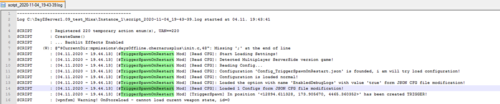
Скрипт, спавнящий указанные Classname объекты (любые, в т.ч. лут и животных) в указанных позициях при входе в зону тригера игрока! Спавн производится сразу, после чего тригер перестает спавнить что-либо до рестарта сервера. После рестарта тригер снова становится активным. Количество спавнящихся объектов не зависит от игрока(ов).
При проблемах с доступом к файлу: Свяжитесь с Dr.Tauren в личных сообщениях.
Почему работа бесплатно и больше не поддерживается: читаем тут
The game for which this product is suitable: DayZ Standalone
Type: script (server-side)
Authorship: I am (123new)
The product is compatible, tested and tested on clean versions of the game: 1.09,1.10,1.11,1.12,1.13,1.14,1.15,1.16,1.17,1.18,1.19,1.20
Description:
A script that spawns the specified Classname objects (any, including loot and animals) in the specified positions when entering the player's trigger zone! The spawn is performed immediately, after which the trigger stops spawning anything until the server restarts. After the restart, the trigger becomes active again. The number of spawning objects does not depend on the player (s).
If there are problems accessing the file: Contact Dr.Tauren in private messages.
Why is the work free and no longer supported: read this
Возможности:
Спавн объектов, простых предметов (объектов без лута), животных, монстров или зомби в указанных точках на карте при входе в зону игрока Можно задавать любые ID объектов или предметов на карте, известные вам в игре Можно указывать дистанции спавна лута или объектов, а также дистанции срабатывания тригера Можно добавить вывод сообщения о спавне в чат Можно отключать те или иные конфигурации за не надобностью, оставляя их при этом в списке json Отсутствует какой-либо состав лута для каждого объекта или предмета. Объекты или предметы будут спавниться в виде 'как есть'. Можно задавать несколько разных точек на карте для объектов или предметов Переспавн или доспавн уже отспавнившихся объектов или предметов на карте до рестарта не производится При рестарте, либо спавне скриптом после рестарта производится проверка в указанных точках по наличию указанных в скрипте объектов при включенной соответствующей настройке Можно задать точное количество объектов или предметов, которое будет соспавнено. Скрипт-мод является чисто-серверным скриптом. Настройки мода вынесены в json-конфиг мода, позволяющий быстро настроить нужное количество монстров, точек их спавна. При отсутствии конфигурационного файла JSON для скрипта, сервер сам пересоздаст конфигурацию спавна мода 'поумолчанию'. При ошибках в конфиге мода он будет пересоздан автоматически на стандартный, при этом ошибки будут отмечены в script-логе сервера. Рекоммендуется держать копию конфигурации и наблюдать за логами сервера после его старта! P.S. ВАЖНО: Скрипт не записывает передвигающихся ИИ, которые перевигаются сами от точки их спавна по карте (зомби, животные и т.п.). Если они уйдут сами от точки спавна и выйдут из зоны очистки - скрипт их не очистит, а тупо доспавнит новых!!! Теоретически, с рестартом все соспавненные должны пропадать, но не проверялось! Использовать данный скрипт для спавна передвигающихся ИИ можно, но на свой страх и риск!
Важно:
Скрипт проверен на чистой версии игры на момент публикации и является работоспособным по сей день и час.
Для работы скрипта подойдут любые объекты или предметы. Наличие возможности добавления в них лута не играет никакой роли, т.к. объекты будут спавниться без него!
Если вы укажете настройки скрипта не верно, сервер сам пересоздаст конфигурацию спавна мода 'поумолчанию'. об этом он напишет в вашем script.log файле
При отсутствии конфигурационного файла JSON для скрипта, сервер сам пересоздаст конфигурацию спавна мода 'поумолчанию'
Основной функционал отлажен и протестирован на чистом сервере.
Скрипт расставляет триггеры на карте по строго указанным координатам их размещения из конфигурации сервера. Он не проверяет эти координаты.
Корректировка указанных в скрипте координат производится только при условии включения соответствующей опции
При расстановке объектов тригером на карте в точке триггера или около него может производиться автокорректировка их с учетом высоты карты автоматически функцией (опция отключаемая), которая добавлено в игру ее разработчиками. Автор скрипта (т.е. я) снимает с себя ответственность за некорректность работы данных функций (да, были прецеденты с другим скриптом)
Скрипт целиком и полностью зависит от корректности работы официальных игровых функций расстановки объектов (функции, имеющиеся в игре и добавленные в нее авторами игры). Автор скрипта (т.е. я) снимает с себя ответственность за некорректность работы данных функций (да, были прецеденты с другим скриптом)
При рестарте сервера может производиться проверка в указанных точках по наличию указанных в скрипте объектов (опция отключается, настраивается). Проверка захватывает все вещи, которые лежат в данной точке в указанном радиусе и эти вещи вписаны в конфигурации скрипта. Проверка производится единоразово при каждом старте сервера.
Opportunities:
Spawn objects, simple objects (objects without loot), animals, monsters or zombies at specified points on the map when entering the player's zone You can set any ID of objects or objects on the map that you know in the game You can specify the distances of spawn loot or objects, as well as the trigger trigger distances You can add the output of the spawn message to the chat , you can disable certain configurations as unnecessary, while leaving them in the json list There is no loot composition for each object or item. Objects or objects will be spawned in the form of 'as is'. You can set several different points on the map for objects or objects that have already been re-spawned or re-spawned objects or objects on the map before the restart is not performed When restarting, or spawning the script after the restart, a check is performed at the specified points for the presence of objects specified in the script with the appropriate setting enabled You can specify the exact number of objects or objects that will be combined. The script mod is a purely server-side script. The mod settings are made in the json config of the mod, which allows you to quickly configure the desired number of monsters, their spawn points. If there is no JSON configuration file for the script, the server itself will recreate the configuration of the spawn mod 'by silence'. If there are errors in the mod's config, it will be recreated automatically to the standard one, and the errors will be noted in the server's script log. It is recommended to keep a copy of the configuration and monitor the server logs after it starts! P.S. IMPORTANT: The script does not record moving AI that move themselves from their spawn point on the map (zombies, animals, etc.). If they leave the spawn point themselves and leave the cleaning zone, the script will not clean them, but stupidly will add new ones!!! Theoretically, with the restart, all the co-spawned ones should disappear, but it was not checked! You can use this script for spawning moving AI, but at your own risk!
Important:
The script was tested on a clean version of the game at the time of publication and is operational to this day and hour. Any objects or objects are suitable for the script to work. The possibility of adding loot to them does not play any role, because the objects will spawn without it! If you specify the script settings incorrectly, the server itself will recreate the configuration of the spawn mod 'by silence'. he will write about this in your script. log file If there is no JSON configuration file for the script, the server itself will recreate the configuration of the spawn mod 'by silence' The main functionality is debugged and tested on a clean server. The script places triggers on the map according to the strictly specified coordinates of their placement from the server configuration. It does not check these coordinates. The coordinates specified in the script are adjusted only if the corresponding option is enabled When placing objects with a trigger on the map at or near the trigger point, they can be auto-corrected taking into account the height of the map automatically by the function (disabled option), which was added to the game by its developers. The author of the script (i.e., I) disclaims responsibility for the incorrect operation of these functions (yes, there were precedents with another script) The script depends entirely on the correctness of the official game functions of the placement of objects (functions available in the game and added to it by the authors of the game). The author of the script (i.e., I) disclaims responsibility for the incorrect operation of these functions (yes, there were precedents with another script) When the server is restarted, it can be checked at the specified points for the presence of objects specified in the script (the option is disabled, configured). The check captures all the things that lie at a given point in the specified radius and these things are written in the script configuration. The check is performed once every time the server starts.
Настройка:
EnabledDebugLogs - включение и отключение дополнительного логирования. 0 - выкл., 1 - вкл.
type_checking - тип поиска и проверки игрока скриптом. Возможные значения: 0, 1 или 2. Подробнее:
Больше настроек в папке с модификацией
Customization:
EnabledDebugLogs - enabling and disabling additional logging. 0 - off, 1-on.
type_checking - the type of search and verification of the player by the script. Possible values: 0, 1 or 2. Learn more:
More settings in directory modification
643 скачивания
(0 отзывов)Обновлено
-
Бесплатно
ObjectsSpawner
Автор:
123new
Игра, для который подходит данный товар: DayZ Standalone
Тип: скрипт (серверный)
Авторство: я (123new)
Товар совместим, тестировался и проверялся на чистых версиях игры: 1.09,1.10,1.11,1.12,1.13,1.14,1.15,1.16,1.17,1.18,1.19,1.20
Описание:
Скрипт, добавляющий спавн указанных объектов (любых объектов, лута, можно зомбей или еще что-либо) в указанных зонах на карте. В скрипте можно указывать свои объекты для схрона по их ID объекта в игре, а также задавать количество схронов на карте и их точки спавна. Скрипт не требуется к наличию игрокам и является серверным.
Отличие от CacheSpawner: вданном скрипте нельзя указать лут на объекте, т.е. спавн происходит простых объектов без лута. В CacheSpawner объекты можно спавнить с лутом и вещами внутри!
Почему скрипт? Ведь эти же действия можно сделать в родных xml файлах сервера или скриптом? Да, знаю, что это же можно сделать так. Добавлен скрипт по просьбам 'трудящихся'. Кому не нужен скриптик - проходим стороной! P.S. И цена по этой же причине соответствующая.
При проблемах с доступом к файлу: Свяжитесь с Dr.Tauren в личных сообщениях.
Почему работа бесплатно и больше не поддерживается: читаем тут
Возможности:
Спавн объектов, простых предметов (объектов без лута) в указанных точках на карте Можно задавать любые ID объектов или предметов на карте, известные вам в игре Отсутствует какой-либо состав лута для каждого объекта или предмета. Объекты или предметы будут спавниться в виде 'как есть'. Можно задавать несколько разных точек на карте для объектов или предметов Автоматический переспавн уже отспавнившихся объектов или предметов на карте через указанное время с очисткой от старых предметов (время указывается в минутах) Можно задать минимальное и максимальное количество объектов или предметов, среди которых сервер при запуске выберет сам случайным образом их количество из всего списка. При указании или выпадении количества объектов или предметов меньшего количества, чем количество координат суммарно в списке, будут выбраны случайным образом схроны к спавну на карте Спавнер является чисто-серверным скриптом Возможность переписать код скрипта под себя, если вам это нужно Настройки мода вынесены в json-конфиг мода, позволяющий быстро настроить нужное количество схронов, точек их спавна и лута. При отсутствии конфигурационного файла JSON для скрипта, сервер сам пересоздаст конфигурацию спавна мода 'поумолчанию'. При ошибках в конфиге мода он будет пересоздан автоматически на стандартный, при этом ошибки будут отмечены в script-логе сервера. Рекоммендуется держать копию конфигурации и наблюдать за логами сервера после его старта!
P.S. ВАЖНО: Скрипт не записывает передвигающихся ИИ, которые перевигаются сами от точки их спавна по карте (зомби, животные и т.п.). Если они уйдут сами от точки спавна и выйдут из зоны очистки - скрипт их не очистит, а тупо доспавнит новых!!! Теоретически, с рестартом все соспавненные должны пропадать, но не проверялось! Использовать данный скрипт для спавна передвигающихся ИИ можно, но на свой страх и риск!
Важно:
Скрипт проверен на чистой версии игры на момент публикации и является работоспособным по сей день и час. Для работы скрипта подойдут любые объекты или предметы. Наличие возможности добавления в них лута не играет никакой роли, т.к. объекты будут спавниться бехз него! Если вы укажете настройки скрипта не верно, сервер сам пересоздаст конфигурацию спавна мода 'поумолчанию' При отсутствии конфигурационного файла JSON для скрипта, сервер сам пересоздаст конфигурацию спавна мода 'поумолчанию' Основной функционал отлажен и протестирован на чистом сервере. Скрипт расставляет объекты на карте по строго указанным координатам их размещения из конфигурации сервера. Он не проверяет эти координаты и не корректирует их Скрипт целиком и полностью зависит от корректности работы официальных игровых функций расстановки объектов (функции, имеющиеся в игре и добавленные в нее авторами игры). Автор скрипта (т.е. я) снимает с себя ответственность за некорректность работы данных функций (да, были прецеденты с другим скриптом)
Настройка:
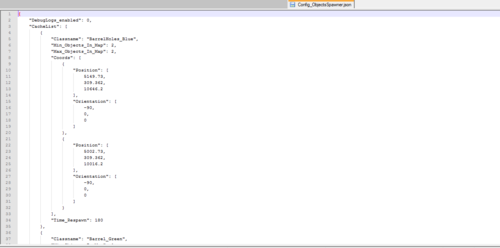
параметр DebugLogs_enabled - включение и отключение дополнительного логирования. 0 - выкл., 1 - вкл. параметр CacheList - массив со списком конфигураций скрипта. параметры для каждого элемента блока CacheList: параметр Classname - ID объекта или предмета, который будет спавниться в данной точке. Этот ID не должен повторяться в других конфигурациях в массиве конфигурационного блока CacheList. Указывается любой известный вам в игре ID объекта или предмета. параметр Min_Objects_In_Map - минимальное количество объектов или предметов данного ID на карте, которое точно будет соспавнено на карте. Варианты значений: любое простое целое число от 0 и выше. (не рекоммендуется указывать много, неизвестно как это повлияет на производительность вашего сервера) Значение в данном параметре не может быть больше, чем число точек спавна, вписанных в параметре Coords. параметр Max_Objects_In_Map - максимально количество объектов или предметов данного ID на карте, которое может быть соспавнено на карте. Варианты значений: любое простое целое число от 0 и выше. Число не должно быть ниже, чем значение в параметре Min_Objects_In_Map (не рекоммендуется указывать много, неизвестно как это повлияет на производительность вашего сервера) Значение в данном параметре не может быть больше, чем число точек спавна, вписанных в параметре Coords. параметр Coords - массив с координатами точек спавна на карте, где могут появляться данные объекты или предметы. Массив состоит из элементов. Каждый из элементов массива содержит 2 векторных значения, первые 3 значения - параметр Position - точка спавна на карте. Вторые 3 значения - параметр Orientation - угол поворота предмета в указанной точке на карте. Таких элементов в массиве может быть бесчисленно много. но важно, чтобы их было не меньше, чем значений, указанных в параметрах Min_Objects_In_Map и Max_Objects_In_Map параметр Time_Respawn - время, через которое указанные объекты или предметы будут переспавнены на каждой точке, где они отспавнятся. Отсчет начинается от момента старта сервера, с рестартом не сохраняется. Время указывается в минутах, значение может быть как целым числом, так и числом с точкой. Значение обязательно больше 0.
Похожие товары, которые могут вас заинтересовать:
The game that this product is suitable for: DayZ Standalone
Type: script (server-side)
Authorship: I am (123new)
The product is compatible, tested and tested on clean versions of the game: 1.09,1.10,1.11,1.12,1.13,1.14,1.15,1.16,1.17,1.18,1.19,1.20
Description:
A script that adds the spawn of the specified objects (any objects, loot, zombies, or anything else) in the specified zones on the map. In the script, you can specify your own caches by their object ID in the game, as well as set the number of caches on the map and their spawn points. The script is not required for the presence of players and is server-side.
Difference from CacheSpawner: in this script, you can't specify loot on an object, i.e. simple objects without loot are spawned. In CacheSpawner, objects can be compared to loot and things inside!
Why the script? After all, the same actions can be done in the server's native xml files or in a script? Yes, I know that it can be done like this. Added a script at the request of 'workers'. Who does not need a script - we pass by! P.S. And the price for the same reason is appropriate.
If you have problems accessing the file: Contact Dr.Tauren in private messages.
Why the work is free and no longer supported: read here
Opportunities:
Spawn objects, simple items (objects without loot) at the specified points on the map You can set any ID of objects or items on the map that you know in the game There is no loot composition for each object or item. Objects or items will be spawned as 'as is'. You can set several different points on the map for objects or items Automatic re-spawn of already spawned objects or items on the map after a specified time with clearing of old items (the time is specified in minutes) You can set the minimum and maximum number of objects or items, among which the server will randomly select their number from the entire list at startup. If you specify or drop the number of objects or items less than the total number of coordinates in the list, the spawn caches on the map will be randomly selected The spavner is a pure server-side script Ability to rewrite the script code for yourself, if you need it Mod settings are made in the json config of the mod, which allows you to quickly configure the desired number of caches, their spawn points and loot. If there is no JSON configuration file for the script, the server itself will recreate the spawn configuration of the mod 'silent'. If there are errors in the mod's config, it will be recreated automatically to the standard one, and errors will be noted in the server's script log. It is recommended to keep a copy of the configuration and monitor the server logs after it starts!
P.S. IMPORTANT: The script does not record moving AI that move themselves from their spawn point on the map (zombies, animals, etc.). If they leave themselves from the spawn point and leave the cleaning zone , the script will not clear them, but stupidly dospavnit new ones!!! In theory
Important:
The script was tested on a clean version of the game at the time of publication and is functional to this day and hour. To run the script, you can use any objects or items. The ability to add loot to them does not play any role, because objects will be spawned without it! If you specify the script settings incorrectly, the server itself will recreate the spawn configuration of the mod 'silent' If there is no JSON configuration file for the script, the server itself will re-create the spawn configuration of the mod 'silent' The main functionality is debugged and tested on a clean server. The script places objects on the map according to the strictly specified coordinates of their placement from the server configuration. It doesn't check these coordinates or correct them The script depends entirely on the correctness of the official game functions of object placement (functions available in the game and added to it by the game authors). The author of the script (i.e. I) disclaims responsibility for the incorrect operation of these functions (Yes, there were precedents with another script)
Customization:
the DebugLogs_enabled parameter - enables or disables additional logging. 0 - off, 1 - on the CacheList parameter is an array with a list of script configurations. parameters for each element of the CacheList block: Classname parameter - ID of the object or item that will be spawned at this point. This ID must not be repeated in other configurations in the array of the CacheList configuration block. Enter any object or item ID you know in the game. the Min_Objects_In_Map parameter is the minimum number of objects or items of this ID on the map that will be exactly matched on the map. Value options: any simple integer from 0 and higher. (it is not recommended to specify a lot, it is not known how this will affect the performance of your server) The value in this parameter cannot be greater than the number of spawn points entered in the Coords parameter. the Max_Objects_In_Map parameter is the maximum number of objects or items of this ID on the map that can be added to the map. Value options: any simple integer from 0 and higher. The number must not be lower than the value in the Min_Objects_In_Map parameter (it is not recommended to specify a lot, it is not known how this will affect the performance of your server) The value in this parameter cannot be greater than the number of spawn points entered in the Coords parameter. the Coords parameter is an array with the coordinates of spawn points on the map where these objects or items can appear. The array consists of elements. Each of the array elements contains 2 vector values, the first 3 values are the Position parameter - the spawn point on the map. The second 3 values are the Orientation parameter - the angle of rotation of the object at the specified point on the map. There can be countless such elements in the array. however, it is important that they are not less than the values specified in the Min_Objects_In_Map and Max_Objects_In_Map parameters the Time_Respawn parameter is the time after which the specified objects or items will be re - spawned at each point where they are spawned. The countdown starts from the moment the server starts, but it is not saved with a restart. The time is specified in minutes, the value can be an integer, and number. The value must be greater than 0.
Similar products that may be of interest to you:
911 скачиваний
(3 отзыва)Обновлено
-
Бесплатно
DonateBodyCleaner
Автор:
123new
Игра, для который подходит данный товар: DayZ Standalone
Тип: скрипт (серверный)
Авторство: я (123new)
Товар совместим, тестировался и проверялся на чистых версиях игры: 1.09,1.10,1.11,1.12,1.13,1.14,1.15,1.16,1.17,1.18,1.19,1.20
Описание:
Скрипт, позволяющий удалять указанные Classname лута с тел игроков при их смерти, либо удалять сами мертвые тела при наличии указанных класснеймов лута! Также, имеется возможность ограничить удаление чисто теми игроками, которые вписаны в список. У остальных удаление не буде производиться.
При проблемах с доступом к файлу: Свяжитесь с Dr.Tauren в личных сообщениях.
Почему работа бесплатно и больше не поддерживается: читаем тут
Возможности:
Удаление указанных предметов по их ID с тел всех убитых игроков в момент смерти (опционально) Удаление указанных предметов по их ID с тел указанных по Steam64ID убитых игроков в момент смерти (опционально) Скидывание предметов на землю из удаляемого контейнера/предмета При нахождении указанных предметов по их ID на телах всех убитых игроков в момент смерти производится удаление самого тела игрока (опционально) При нахождении указанных предметов по их ID на телах указанных по Steam64ID игроков в момент смерти производится удаление самого тела игрока (опционально) Является чисто-серверным скриптом Возможность переписать код скрипта под себя, если вам это нужно Настройки мода вынесены в json-конфиг мода, позволяющий быстро настроить нужное количество схронов, точек их спавна и лута. При ошибках в конфиге мода он будет пересоздан автоматически на стандартный, при этом ошибки будут отмечены в script-логе сервера. Рекоммендуется держать копию конфигурации и наблюдать за логами сервера после его старта!
Важно:
Скрипт может работать некорректно или не работать вообще на серверах с модами, на которых происходят какие-либо действия с трупом игрока (например, труп игрока заменяется на крест с лутом или любой другой предмет) Если вы укажете настройки скрипта не верно, сервер сам пересоздаст конфигурацию мода 'поумолчанию' Для корректной работы скрипта обязательно должны быть указаны любые Classname предметов в списке. Если Classname указан не верно - он игнорируется. Основной функционал отлажен и протестирован на чистом сервере.
Настройка:
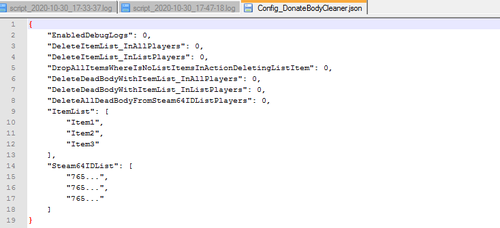
EnabledDebugLogs - включение и отключение расширенных логов в script.log файле сервера для отладки проблемных ситуаций в коде и анализа действий скрипта (0 - выкл., 1 - вкл.)
DeleteItemList_InAllPlayers - включение и отключение удаления всех найденных предметов из ItemList в телах всех игроков сервера при их смерти (0 - выкл., 1 - вкл.)
DeleteItemList_InListPlayers - включение и отключение удаления всех найденных предметов из ItemList в телах указанных в Steam64IDList игроков сервера при их смерти (0 - выкл., 1 - вкл.)
DropAllItemsWhereIsNoListItemsInActionDeletingListItem - включение и отключение сброса на землю всего содержимого обнаруженного объекта перед его удалением. (0 - выкл., 1 - вкл.). Работает только при DeleteItemList_InAllPlayers =1 или DeleteItemList_InListPlayers =1
DeleteDeadBodyWithItemList_InAllPlayers - включение и отключение удаления мертвых тел для всех игроков при их смерти при условии нахождения в них указанных предметов из ItemList (0 - выкл., 1 - вкл.)
DeleteDeadBodyWithItemList_InListPlayers - включение и отключение удаления мертвых тел указанных в Steam64IDList игроков при их смерти при условии нахождения в них указанных предметов из ItemList (0 - выкл., 1 - вкл.)
DeleteAllDeadBodyFromSteam64IDListPlayers - включение и отключение удаления мертвых тел указанных в Steam64IDList игроков при их смерти вне зависимости от нахождения в них указанных предметов из ItemList (0 - выкл., 1 - вкл.)
ItemList - список предметов, которые будут искаться у игроков в инвентаре. Любые текстовые значения.
Steam64IDList - список Steam64 ID игроков, которые будут проверяться в указанных выше опциях. Любые текстовые значения.
The game for which this product is suitable: DayZ Standalone
Type: script (server-side)
Authorship: I am (123new)
The product is compatible, tested and tested on clean versions of the game: 1.09,1.10,1.11,1.12,1.13,1.14,1.15,1.16,1.17,1.18,1.19,1.20
Description:
A script that allows you to delete the specified Classname loot from the bodies of players when they die, or delete the dead bodies themselves if there are specified classname loot! Also, it is possible to limit the deletion purely to those players who are included in the list. The rest will not be deleted.
data!
If you have problems accessing the file: Contact Dr.Tauren in private messages.
Why the work is free and no longer supported: read here
Opportunities:
Removal of the specified items by their ID from the bodies of all killed players at the time of death (optional) Removal of the specified items by their ID from the bodies of the killed players specified by Steam64ID at the time of death (optional) Dropping objects to the ground from the container/object being removed If the specified items are found by their ID on the bodies of all killed players at the time of death, the player's body itself is deleted (optional) If the specified items are found by their ID on the bodies of the players specified by Steam64ID at the time of death, the player's body itself is deleted (optional) It is a purely server-side script The ability to rewrite the script code for yourself, if you need it The mod settings are made in the json config of the mod, which allows you to quickly configure the desired number of caches, their spawn points and loot. If there are errors in the mod's config, it will be recreated automatically to the standard one, and the errors will be noted in the server's script log. It is recommended to keep a copy of the configuration and monitor the server logs after it starts!
Important:
The script may not work correctly or may not work at all on servers with mods where any actions occur with the player's corpse (for example, the player's corpse is replaced with a cross with loot or any other object) If you specify the script settings incorrectly, the server will recreate the mod configuration itself 'by default' For the script to work correctly, any Classname of the items in the list must be specified. If the Classname is specified incorrectly , it is ignored. The main functionality is debugged and tested on a clean server.
Customization:
EnabledDebugLogs - enabling and disabling extended logs in the script. log file of the server for debugging problem situations in the code and analyzing script actions (0 - off, 1-on)
DeleteItemList_InAllPlayers -enabling and disabling the removal of all found items from the ItemList in the bodies of all server players when they die (0 - off, 1-on)
DeleteItemList_InListPlayers - enabling and disabling the removal of all found items from the ItemList in the cases specified in the Steam 64 ID List of server players at their death (0 - off, 1-on)
DropAllItemsWhereIsNoListItemsInActionDeletingListItem - enabling and disabling the dumping of all the contents of the detected object to the ground before deleting it. (0 - off, 1-on). Works only when Delete Item List_In All Players =1 or Delete Item List_In List Players =1
DeleteDeadBodyWithItemList_InAllPlayers - enabling and disabling the removal of dead bodies for all players when they die, provided that the specified items from the ItemList are found in them (0 - off, 1-on)
DeleteDeadBodyWithItemList_InListPlayers - enabling and disabling the removal of dead bodies of players specified in the Steam 64 ID List when they die, provided that the specified items from the ItemList are found in them (0 - off, 1-on)
DeleteAllDeadBodyFromSteam64IDListPlayers - enabling and disabling the removal of dead bodies of players specified in the Steam 64 ID List when they die, regardless of whether the specified items from the ItemList are found in them (0 - off, 1-on)
ItemList - a list of items that will be searched for in the players ' inventory. Any text values.
Steam64IDList -a list of Steam64 player IDs that will be checked in the above options. Any text values.
465 скачиваний
(3 отзыва)Обновлено
-
Бесплатно
Disable Construction And Deconstruction / Отключение Строительства и Разборки в указанных точках карты
Автор:
123new
Тип: серверный мод
Игра, для который подходит данный товар: DayZ Standalone
Авторство: я (123new)
Товар совместим, тестировался и проверялся на чистых версиях игры: 1.10,1.11,1.12,1.13,1.14,1.15,1.16,1.17,1.18,1.19,1.20
Описание:
Серверный мод, осуществляющий запрет постройки и разбора построек на сервере, а также копку грядок в указанных вами зонах на карте. Мод не требуется к наличию игрокам и является чисто серверным.
При проблемах с доступом к файлу: Свяжитесь с Dr.Tauren в личных сообщениях.
Почему работа бесплатно и больше не поддерживается: читаем тут
Возможности:
Гибкий json-конфиг мода, избавляет вас от необходимости переписывать постоянно скрипты. При ошибках в конфиге мода он будет пересоздан автоматически, при этом ошибки будут отмечены в script-логе сервера Отключение возможности постройки внутри зон защиты Отключены возможности разборки внутри зон защиты Настраиваемые уведомления в чат для оповещения пользователя о запретах в зоне Исключения для возможности стройки в зонах защиты Логирование каждого действия срабатывания защиты в script-log файл сервера
Важно:
Работоспособность скрипта проверена и заточена на чистую версию игры без модификаций с новыми элементами постройки. Возможно, для добавления защиты под модовые элементы построек вам прийдется дописывать часть скриптов в моде самим, будьте готовы! Разделение по типам действий и настройки для скрипта не производилось в целях экономии стоимости скрипта. Скрипт проверен на чистой версии игры версии игры 1.07.153006 на момент публикации и является работоспособным по сей день и час.
Настройка:
Параметр enable_auto_restart_server_timer - включает и отключает работу всего скрипта. При false будет отключен, и остальные настройки будут отключены, но они должны быть в наличии. Формат значений - true или false Параметр Activate_ChatMessage_For_Blocked_Actions - включает и отключает чат-сообщение игроку при блокировании действий постройки и разбора в защищенной зоне. При false будет отключено. Формат значений - true или false Параметр Activate_ChatMessage_For_Allowed_Actions - включает и отключает чат-сообщение игроку при разрешении действий постройки и разбора в защищенной зоне для вписанных игроков. При false будет отключено. Формат значений - true или false Параметр Chat_Message_Block_Build - Чат-сообщение, которое пишется игроку в чат при блокировании действий постройки или разбора в защищенной зоне. Работает при Activate_ChatMessage_For_Blocked_Actions = true. Формат значений - любой текст. Параметр Chat_Message_Access_Build - Чат-сообщение, которое пишется игроку в чат при разрешении действий постройки или разбора в защищенной зоне. Работает при Activate_ChatMessage_For_Allowed_Actions = true. Формат значений - любой текст. Параметр ZonesMassive - Массив с конфигурациями зон. Минимум 1 элемент обязательно должен быть. Параметр secured_point - точка на карте в формате X Y Z (Y - высота). Все 3 значения чувствительны к правильности. Будьте внимательны, если ошибетесь с высотой, дистанция будет считаться от указанной вами точки на высоте. Формат значений - числа с точкой. Параметр distance_secure - дистанция защиты по радиусу от указанной в secured_point точки на карте. Указывается число, которое больше нуля. Формат значений - числа с точкой. Параметр Steam64IDS_With_ACCESS - массив Steam64ID игроков (как получить - гугл в помощь), которые имеют доступ к строительству и разбору построек в зоне. Несколько значений указываются через запятую. Формат значений - текст. Минимум 1 элемент обязательно должен быть. Параметр Allowed_for_Building - массив ID построек, которые игроки могут построить/установить в зоне без какого-либо запрета. Проще говоря, список исключений. Несколько значений указываются через запятую. Формат значений - текст. Минимум 1 элемент обязательно должен быть.
Type: Server mod
The game for which this product is suitable: DayZ Standalone
Authorship: I am (123new)
The product is compatible, tested and tested on clean versions of the game: 1.10,1.11,1.12,1.13,1.14,1.15,1.16,1.17,1.18,1.19,1.20
Description:
A server mod that prohibits the construction and disassembly of buildings on the server, as well as digging beds in the zones you specified on the map. The mod is not required for the presence of players and is purely server-side.
If you have problems accessing the file: Contact Dr.Tauren in private messages.
Why the work is free and no longer supported: read here
Opportunities:
Flexible json config of the mod, saves you from having to constantly rewrite scripts. If there are errors in the mod's config, it will be recreated automatically, and the errors will be noted in the server's script log Disabling the possibility of building inside the protection zones Disassembly capabilities inside the protection zones are disabled Customizable chat notifications to notify the user about bans in the zone Exceptions for the possibility of construction in protection zones Logging of each protection trigger action in the server script-log file
Important:
The functionality of the script has been tested and sharpened for a clean version of the game without modifications with new construction elements. Perhaps, to add protection for the code elements of buildings, you will have to add some of the scripts in the mod yourself, be prepared! The separation by types of actions and settings for the script was not made in order to save the cost of the script. The script was tested on a clean version of the game version of the game 1.07.153006 at the time of publication and is operational to this day and hour.
Customization:
Parameter enable_auto_restart_server_timer - enables and disables the entire script. If false, it will be disabled, and the rest of the settings will be disabled, but they must be available. The format of the values is true or false Parameter Activate_ChatMessage_For_Blocked_Actions - enables and disables the chat message to the player when blocking the actions of construction and parsing in the protected zone. If false, it will be disabled. The format of the values is true or false Parameter Activate_ChatMessage_For_Allowed_Actions - enables and disables the chat message to the player when allowing the actions of construction and parsing in the protected zone for the entered players. If false, it will be disabled. The format of the values is true or false Parameter Chat_Message_Block_Build - Chat-a message that is written to the player in the chat when blocking the actions of construction or parsing in the protected zone. Works when Activate_ChatMessage_For_Blocked_Actions = true. The format of the values is any text. Parameter Chat_Message_Access_Build - Chat-a message that is written to the player in the chat when allowing the actions of construction or parsing in a protected zone. Works when Activate_Chat Message_For_Allowed_Actions = true. The format of the values is any text. Parameter ZonesMassive - An array with zone configurations. There must be at least 1 element. Parameter secured_point - a point on the map in the format X Y Z (Y is the height). All 3 values are sensitive to correctness. Be careful, if you make a mistake with the height, the distance will be calculated from the point you specified at the height. The format of the values is numbers with a dot. Parameter distance_secure - the protection distance by radius from the point specified in secure_point on the map. A number that is greater than zero is specified. The format of the values is numbers with a dot. Parameter Steam64IDS_With_ACCESS - an array of Steam64ID players (how to get-Google for help) who have access to the construction and analysis of buildings in the zone. Multiple values are separated by commas. The format of the values is text. There must be at least 1 element. Parameter Allowed_for_Building - an array of building IDs that players can build/install in the zone without any prohibition. Simply put, a list of exceptions. Multiple values are separated by commas. The format of the values is text. There must be at least 1 element.
786 скачиваний
(7 отзывов)Обновлено
-
Бесплатно
ESP Players | ESP на дистанции от игрока на карте
Автор:
123new
Игра, для который подходит данный товар: DayZ Standalone
Тип: мод (клиентский + серверный)
Авторство: Sania (проект ZoS)
Товар совместим, тестировался и проверялся на чистых версиях игры: 1.07, 1.08, 1.09,1.10,1.11,1.12,1.13,1.14,1.15,1.16,1.17,1.18,1.19,1.20
Описание:
Мод, добавляющий для всех игроков метки с никами к игрокам (ESP) на определенной дистанции от самого игрока (например, в 30 метрах). Можно настраивать шрифт меток, цвет меток, включать отображение дистанции до игрока, а также иконку голосового чата для говорящих в Voice-чат игроков, дальность отображения меток. Мод требуется к наличию игрокам и является клиент-серверным. В чисто серверной связке не работает!!!
При проблемах с доступом к файлу: Свяжитесь с Dr.Tauren в личных сообщениях.
Почему работа бесплатно и больше не поддерживается: читаем тут
Возможности:
Отображение ESP-меток для всех игроков на указанной дистанции. При выходе игроков из обозначенной зоны дистанции ESP метки автоматически пропадают у вас с экрана. При удалении игроков от вас на дистанцию, превышающую обозначенную, метка автоматически удаляются. Настройки мода вынесены в json-конфиг мода, позволяющий быстро настроить сами метки и дистанцию. При ошибках в конфиге мода он будет пересоздан автоматически на стандартный, при этом ошибки будут отмечены в script-логе сервера. Рекоммендуется держать копию конфигурации и наблюдать за логами сервера после его старта!
Важно:
Скрипт проверен на чистой версии игры версии игры на момент публикации и является работоспособным по сей день и час. Клиентская часть скрипта защищена от изменений системой шифования. Из-за этого при включенном параметре запуска -dologs у сервера/клиента игры будет возникать ошибка требования мода, который не нужен. Для исправления этой проблемы приложен фикс-мод, который также потребуется вам включить (если он уже имеется у вас, повторно он не нужен). Если вы не используете этого параметра, этот мод вам не требуется! Клиентская часть мода разрешена к запаковке в собственные пакеты модов для собственных серверов в неизменном виде (переименовать pbo файл можно). Для этого достаточно поместить pbo-файлы клиентской части мода в папку addons вашего пакета модов и подписать своими ключами! Поумолчанию мод не подписан никаким ключем, для проверки полноценной работы на вашем сервере его необходимо подписать! (Серверную часть подписывать не обязательно)
Настройка:
Параметр Activate_Vioce_Icons - включает и отключает отображение иконок голосового чата при разговоре в голосовой чат игроков. Формат значений - 1 - включено, 0 - выключено. Параметр Activate_KeyBind - включает и отключает бинд на клавишу для скрытия интерфейса мода у игроков. Формат значений - 1 - включено, 0 - выключено. Параметр MenuKeyBind - Задает активную клавишу для скрытия интерфейса мода у игрока. Работает только при Activate_KeyBind = 1. Если Activate_KeyBind = 0 то значение можно не трогать! Формат значений - текст KC_ + имя кнопки на клавиатуре. Параметр Radius_ESPViev - дистанция работы скрипта от игрока (вас в том числе). Указывается число, которое больше нуля. Формат значений - число с точкой. Параметр Color_RGB - Формат цвета в RGB векторе (можно подобрать например тут). Все 3 значения чувствительны к правильности. Каждое из 3 значений указываете значение в формате от 0 до 255. Формат значений - простые числа. Параметр TextIsBold - включает и отключает жирность текста у метки игроков. Формат значений - 1 - жирный текст, 0 - обычный Параметр TextIsItalic - включает и отключает курсив текста у метки игроков. Формат значений - 1 - курсивный текст, 0 - обычный Параметр TextSize - задает размер текста метки на экране. Формат значений - простое число от 8 до 28 Параметр ShowDistanceToPlayer - включает и отключает метку дистанции рядом с ником игрока в метке. Формат значений - 1 - включено, 0 - выключено.
Похожие товары, которые могут вас заинтересовать:
The game for which this product is suitable: DayZ Standalone
Type: Mod (client + Server)
Author: Sania (ZoS project)
The product is compatible, tested and tested on clean versions of the game: 1.07, 1.08, 1.09,1.10,1.11,1.12,1.13,1.14,1.15,1.16,1.17,1.18,1.19,1.20
Description:
A mod that adds tags with nicknames to players (ESP) for all players at a certain distance from the player himself (for example, 30 meters). You can customize the font of the placemarks, the color of the placemarks, enable the display of the distance to the player, as well as the voice chat icon for the players who speak in the Voice chat, and the range of the placemarks. The mod is required for the presence of players and is client-server. It doesn't work in a purely server bundle!!!
If you have problems accessing the file: Contact Dr.Tauren in private messages.
Why the work is free and no longer supported: read here
Opportunities:
Displays ESP tags for all players at the specified distance. When players exit the designated ESP distance zone, the tags automatically disappear from your screen. When players are removed from you by a distance greater than the designated distance, the placemark is automatically removed. The mod settings are made in the json config of the mod, which allows you to quickly configure the tags and distance themselves. If there are errors in the mod's config, it will be automatically recreated to the standard one, and the errors will be noted in the server's script log. It is recommended to keep a copy of the configuration and monitor the server logs after it starts!
Important:
The script was tested on the clean version of the game version of the game at the time of publication and is still working to this day and hour. The client part of the script is protected from changes by the encryption system. Because of this, when the -dologs startup option is enabled, the game server / client will have an error requesting a mod that is not needed. To fix this problem, a fix mod is attached, which you will also need to enable (if you already have it, you do not need it again). If you don't use this option, you don't need this mod! The client part of the mod is allowed to be packaged in its own mod packages for its own servers in an unchanged form (you can rename the pbo file). To do this, just put the pbo files of the client part of the mod in the addons folder of your mod package and sign it with your own keys! By default, the mod is not signed by any key, to check the full operation on your server, you need to sign it! (You don't have to sign the server part)
Customization:
The Activate_Vioce_Icons parameter-enables and disables the display of voice chat icons when talking in the players voice chat. The format of the values is 1-on, 0-off. The Activate_KeyBind parameter-enables and disables the bind on the key to hide the mod interface from players. The format of the values is 1-on, 0-off. The MenuKeyBind parameter-Sets the active key to hide the mod interface from the player. Works only when Activate_KeyBind = 1. If Activate_KeyBind = 0 then the value can be left untouched! The format of the values is the text KC_ + the name of the button on the keyboard. The Radius_ESPViev parameter is the distance of the script from the player (including you). Specifies a number that is greater than zero. The format of the values is a number with a dot. The Color_RGB parameter is the color format in the RGB vector (you can choose it here, for example). All 3 values are sensitive to correctness. For each of the 3 values, specify a value in the format from 0 to 255. The format of the values is prime numbers. The TextIsBold parameter-enables and disables the greasiness of the text at the players placemark. Value format-1-bold text, 0 - plain text The TextIsItalic parameter-enables and disables text italics for the players placemark. Value format-1-italic text, 0 - normal text The TextSize parameter-sets the size of the placemark text on the screen. The format of the values is a prime number from 8 to 28 The ShowDistanceToPlayer parameter-enables and disables the distance tag next to the player's nickname in the tag. The format of the values is 1-on, 0-off.
Related products that may interest you:
1122 скачивания
(0 отзывов)Обновлено
-
Бесплатно
ESP Zones (Esp Trader Zones) | ESP для трейд зон, любых зон на карте
Автор:
123new
Игра, для который подходит данный товар: DayZ Standalone
Тип: мод (клиентский + серверный)
Авторство: Sania (проект ZoS)
Товар совместим, тестировался и проверялся на чистых версиях игры: 1.07, 1.08, 1.09,1.10,1.11,1.12, 1.13,1.14,1.15,1.16,1.17,1.18,1.19,1.20
Описание:
Мод, добавляющий для всех игроков метки с никами к игрокам (ESP) в обозначенных на карте зонах (например, в трейд зонах). Можно настраивать точки на карте, шрифт меток, цвет меток, включать отображение дистанции до игрока, а также иконку голосового чата для говорящих в Voice-чат игроков. Мод требуется к наличию игрокам и является клиент-серверным. В чисто серверной связке не работает!!!
При проблемах с доступом к файлу: Свяжитесь с Dr.Tauren в личных сообщениях.
Почему работа бесплатно и больше не поддерживается: читаем тут
Возможности:
Отображение ESP-меток для всех игроков в зонах, обозначенных в моде. При выходе игроков из зоны ESP метки автоматически пропадают у вас с экрана. При нахождении вас в зоне ESP-меток и удалении игроков от вас на дистанцию, превышающую обозначенную, метка автоматически удаляются. Настройки мода вынесены в json-конфиг мода, позволяющий быстро настроить нужное количество зон вам быстро и непритязатьельно. При ошибках в конфиге мода он будет пересоздан автоматически на стандартный, при этом ошибки будут отмечены в script-логе сервера. Рекоммендуется держать копию конфигурации и наблюдать за логами сервера после его старта! Возможность задать для каждой точки свои настройки, такие как цвет метки, шрифт метки, радиус дистанции отображения меток и метка дистанции до игрока
Важно:
Скрипт проверен на чистой версии игры версии игры 1.07.153006 на момент публикации и является работоспособным по сей день и час.
Клиентская часть скрипта защищена от изменений системой шифования. Из-за этого при включенном параметре запуска -dologs у сервера/клиента игры будет возникать ошибка требования мода, который не нужен. Для исправления этой проблемы приложен фикс-мод, который также потребуется вам включить (если он уже имеется у вас, повторно он не нужен). Если вы не используете этого параметра, этот мод вам не требуется!
Клиентская часть мода разрешена к запаковке в собственные пакеты модов для собственных серверов в неизменном виде (переименовать pbo файл можно). Для этого достаточно поместить pbo-файлы клиентской части мода в папку addons вашего пакета модов и подписать своими ключами!
Поумолчанию мод не подписан никаким ключем, для проверки полноценной работы на вашем сервере его необходимо подписать! (Серверную часть подписывать не обязательно)
Настройка:
Параметр Activate_Vioce_Icons - включает и отключает отображение иконок голосового чата при разговоре в голосовой чат игроков. Формат значений - 1 - включено, 0 - выключено.
Параметр Activate_KeyBind - включает и отключает бинд на клавишу для скрытия интерфейса мода у игроков. Формат значений - 1 - включено, 0 - выключено.
Параметр MenuKeyBind - Задает активную клавишу для скрытия интерфейса мода у игрока. Работает только при Activate_KeyBind = 1. Если Activate_KeyBind = 0 то значение можно не трогать! Формат значений - текст KC_ + имя кнопки на клавиатуре.
Параметр ZonesMassive - Массив с конфигурациями зон. Минимум 1 элемент обязательно должен быть.
Параметр ESP_Point - точка на карте в формате X Y Z (Y - высота). Все 3 значения чувствительны к правильности. Будьте внимательны, если ошибетесь с высотой, дистанция будет считаться от указанной вами точки на высоте. Формат значений - числа с точкой больше 0, разделенные запятой.
Параметр Radius_ESPViev - дистанция работы скрипта в указанной в ESP_Point точке на карте. Указывается число, которое больше нуля. Формат значений - число с точкой.
Параметр Color_RGB - Формат цвета в RGB векторе (можно подобрать например тут). Все 3 значения чувствительны к правильности. Каждое из 3 значений указываете значение в формате от 0 до 255. Формат значений - простые числа.
Параметр TextIsBold - включает и отключает жирность текста у метки игроков. Формат значений - 1 - жирный текст, 0 - обычный
Параметр TextIsItalic - включает и отключает курсив текста у метки игроков. Формат значений - 1 - курсивный текст, 0 - обычный
Параметр TextSize - задает размер текста метки на экране. Формат значений - простое число от 8 до 28
Параметр ShowDistanceToPlayer - включает и отключает метку дистанции рядом с ником игрока в метке. Формат значений - 1 - включено, 0 - выключено.
Похожие товары, которые могут вас заинтересовать:
The game for which this product is suitable: DayZ Standalone
Type: Mod (client + Server)
Authorship: Sanya (ZoS project3
The product is compatible, tested and tested on clean versions of the game: 1.07, 1.08, 1.09,1.10,1.11,1.12,1.13,1.14,1.15,1.16,1.17,1.18,1.19,1.20
Description:
A mod that adds all players to the player's nickname tags (ESP) in areas marked on the map (for example, in trade zones). You can customize the points on the map, the font of the placemarks, the color of the placemarks, enable the display of the distance to the player, as well as the voice chat icon for the players who speak in the Voice chat. The mod is required for the presence of players and is client-server. It doesn't work in a purely server bundle!!!
If you have problems accessing the file: Contact Dr.Tauren in private messages.
Why the work is free and no longer supported: read here
Opportunities:
Displays ESP tags for all players in the zones marked in the mod. When players exit the ESP zone, the tags automatically disappear from your screen. If you are in the ESP-tag zone and players are removed from you by a distance greater than the designated distance, the tag is automatically removed. The mod settings are made in the json config of the mod, which allows you to quickly configure the desired number of zones for you quickly and unassumingly. If there are errors in the mod's config, it will be automatically recreated to the standard one, and the errors will be noted in the server's script log. It is recommended to keep a copy of the configuration and monitor the server logs after it starts! The ability to set your own settings for each point, such as the color of the placemark, the font of the placemark, the radius of the distance of the placemark display and the distance mark to the player
Important:
The script was tested on the clean version of the game version of the game 1.07.153006 at the time of publication and is still operational to this day and hour.
The client part of the script is protected from changes by the encryption system. Because of this, when the-dologs startup option is enabled, the game server / client will have an error requesting a mod that is not needed. To fix this problem, a fix mod is attached, which you will also need to enable (if you already have it, you do not need it again). If you don't use this option, you don't need this mod!
The client part of the mod is allowed to be packaged in its own mod packages for its own servers in an unchanged form (you can rename the pbo file). To do this, just place the pbo files of the client part of the mod in the addons folder of your mod package and sign with your own keys!
By default, the mod is not signed by any key, to check the full operation on your server, you need to sign it! (You don't have to sign the server part)
Customization:
The Activate_Vioce_Icons parameter-enables and disables the display of voice chat icons when talking in the players ' voice chat. The format of the values is 1-on, 0-off.
The Activate_KeyBind parameter-enables and disables the bind on the key to hide the mod interface from players. The format of the values is 1-on, 0-off.
The MenuKeyBind parameter-Sets the active key to hide the mod interface from the player. Works only when Activate_KeyBind = 1. If Activate_KeyBind = 0 then the value can be left untouched! The format of the values is the text KC_ + the name of the button on the keyboard.
The ZonesMassive parameter is an array with zone configurations. There must be at least 1 element.
The ESP_Point parameter is a point on the map in the format X Y Z (Y is the height). All 3 values are sensitive to correctness. Be careful, if you make a mistake with the height, the distance will be calculated from the point you specified at the height. The format of the values is numbers with a dot greater than 0, separated by a comma.
The Radius_ESPViev parameter is the distance of the script operation at the point specified in the ESP_Point on the map. Specifies a number that is greater than zero. The format of the values is a number with a dot.
The Color_RGB parameter is the color format in the RGB vector (you can choose it here, for example). All 3 values are sensitive to correctness. For each of the 3 values, specify a value in the format from 0 to 255. The format of the values is prime numbers.
The TextIsBold parameter-enables and disables the greasiness of the text on the players ' placemark. Value format-1-bold text, 0 - plain text
The TextIsItalic parameter-enables and disables text italics for the players ' placemark. Value format-1-italic text, 0 - normal text
The TextSize parameter-sets the size of the placemark text on the screen. The format of the values is a prime number from 8 to 28
The ShowDistanceToPlayer parameter-enables and disables the distance tag next to the player's nickname in the tag. The format of the values is 1-on, 0-off.
Related products that you may be interested in:
1272 скачивания
(4 отзыва)Обновлено


- Кто может продавать файлы?
- Условия использования








Объявления
-
Рекомендуемый продукт
VIP-статус
330.00 RUB
385.00 RUB -
Отзывы
-

-

-

-
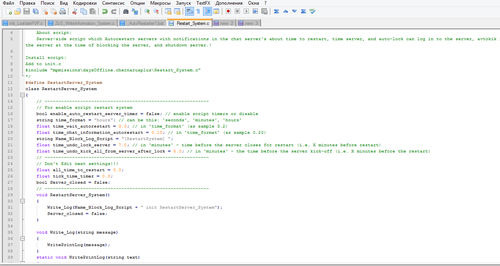
 Автор: SuperNova45 · Опубликовано:Скрипт не стартует, сервер работает, в логах только это: SCRIPT (W): @"$CurrentDir:mpmissions/dayzOffline.chernarusplus/Restart_System.c,789": FIX-ME: Unexpected statement 'ref' SCRIPT (W): @"$CurrentDir:mpmissions/dayzOffline.chernarusplus/Restart_System.c,93": Possible variable name conflict 'Name_Block_Log_Script' SCRIPT (W): @"$CurrentDir:mpmissions/dayzOffline.chernarusplus/Restart_System.c,383": Possible variable name conflict 'time_wait_autorestart' SCRIPT (W
 -

-
 Автор: Subility · Опубликовано:Привет. Может кто подсказать что я делаю не так? Выдает вот такую ошибку Compile error Can't compile mission init script'! $CurrentDir://mpmissions//dayzOffline.chernarusplus//BotMissions//BotGr oupMissionTisy.c(69): Undefined function 'SurvivorBotBase.SetUseCheckpoint'
 -

-

-